

-
Products
Overview Products

-
2D Cutting
-
Tube Cutting
-
3D Cutting
-
Intelligent Welding
-
Intelligent Cutting Head
-
Industrial Automation
-
Industrial Software
-
Combination
-
Combination
BOCHU New Product -
Combination
BOCHU New Product -
Controller
BOCHU New Product -
2D Cutting Head
Tube Cutting Head
3D Cutting Head
Consumables
BOCHU New Product -
Servo
BOCHU New Product -
Industrial 4.0
-
- Support
- About
- Online Store



品列表圖片_514x337.png)



品頁規(guī)格型號(hào).png)

品列表.png)



- Software Download
- Manual
- Video
- Tutorial
-
-
-
-
-
Multi Language
Multi Language
There are two ways to change CypCut interface language.
1.Language drop-down menu. CypCut language set in View > Language drop down menu, which is existing language options. If the language you want not in the list, you can add a?
language pack for it.
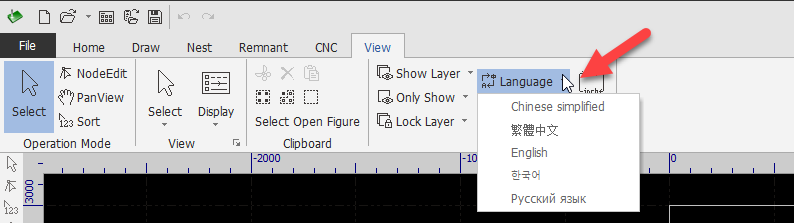
2. Language pack. User can add a new language option in CypCut by translating existing language file into target language needed. The default path of CypCut language file in
C:\Program Files (x86)\Friendess\CypCut\language.
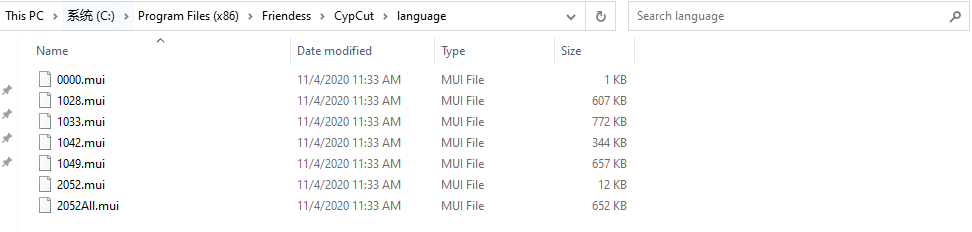
Make an example by translating English language file(1033.mui) to target language of Spanish. After you already finished translation, there are two positions you need modify to make
CypCut can identify the file and display the language option in list. The first is 'locale ID', see in below image, must be same with file name; the second is 'Title' which is the
language type. You may experience the display problems if you missed some text strings or tags during translating or file editing. You can contact FSCUT support for file review.
Notice: for language file naming rules, you can take reference in Microsoft locale ID values.
- Related article: Translation Tool
-
-
-
-
Multi Language
There are two ways to change CypCut interface language.
1.Language drop-down menu. CypCut language set in View > Language drop down menu, which is existing language options. If the language you want not in the list, you can add a?
language pack for it.
2. Language pack. User can add a new language option in CypCut by translating existing language file into target language needed. The default path of CypCut language file in
C:\Program Files (x86)\Friendess\CypCut\language.
Make an example by translating English language file(1033.mui) to target language of Spanish. After you already finished translation, there are two positions you need modify to make
CypCut can identify the file and display the language option in list. The first is 'locale ID', see in below image, must be same with file name; the second is 'Title' which is the
language type. You may experience the display problems if you missed some text strings or tags during translating or file editing. You can contact FSCUT support for file review.
Notice: for language file naming rules, you can take reference in Microsoft locale ID values.
- Related article: Translation Tool

