

-
Products
Overview Products

-
2D Cutting
-
Tube Cutting
-
3D Cutting
-
Intelligent Welding
-
Intelligent Cutting Head
-
Industrial Automation
-
Industrial Software
-
Combination
-
Combination
BOCHU New Product -
Combination
BOCHU New Product -
Controller
BOCHU New Product -
2D Cutting Head
Tube Cutting Head
3D Cutting Head
Consumables
BOCHU New Product -
Servo
BOCHU New Product -
Industrial 4.0
-
- Support
- About
- Online Store



品列表圖片_514x337.png)



品頁規(guī)格型號.png)

品列表.png)



- Software Download
- Manual
- Video
- Tutorial
-
-
-
-
-
(Basics) Pre-Knowledge
CypCut Pre Knowledge
Get familiar with some pre-knowledge including CypCut user interface, machine config tool, hardware components, OEM version, and system license that get you prepared to follow
‘Basics topic’ series.?
- CypCut System Diagram
- CypCut User Interface
- CypCut About Window
- CypCut Machine Config Tool
- CypCut OEM Version
- BCS100 Height Control Unit
?
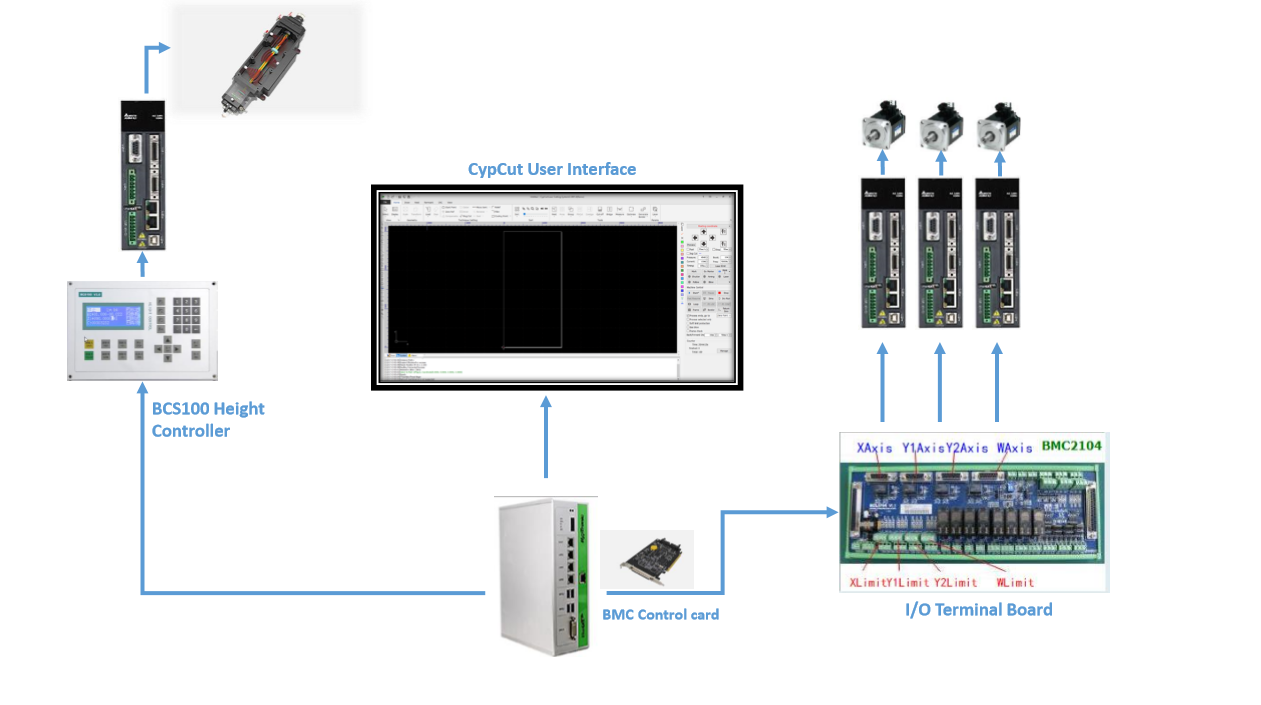
CypCut System Diagram
CypCut is hardware-based program in machine controlling.
?
CypCut Interface
CypCut is designed as graphical user interface with windows ribbon style.
? ? ?
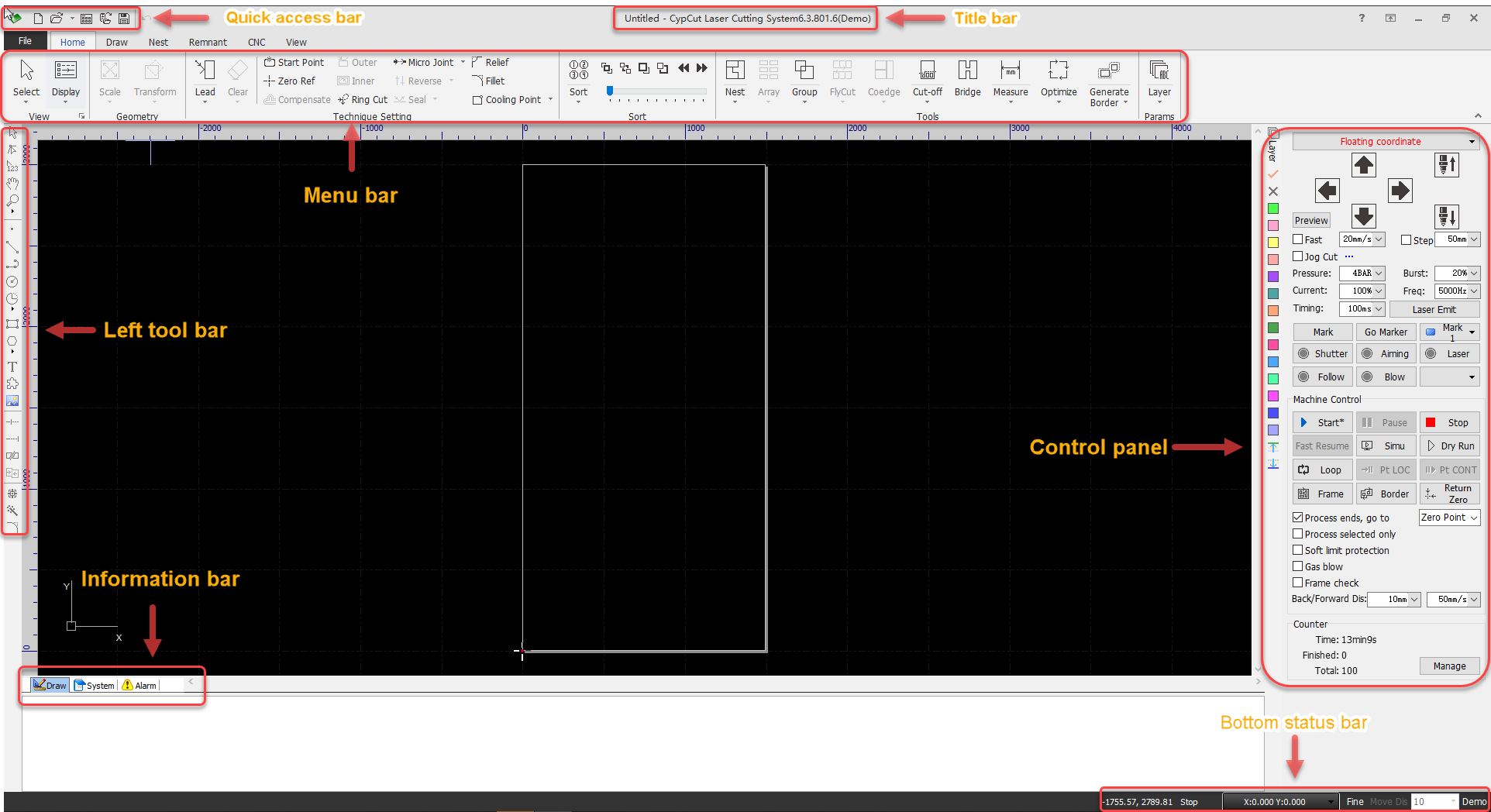 ? ??
? ??- Drawing board (middle area in black) displays the parts geometry that you currently work on. The white box in the center is machine-scaled working zone.
- Title bar (at the very top) shows CypCut version message. On the left gives you Quick access to create a new file, open or save file.?
- Menu bar (underneath the title bar) displays File, Home, Draw, Nest, CNC and View tabs.
- Left tool bar lists quick access tools for sorting, drawing and editing etc.
- Control panel (on the right) is where you control machine finish a cutting task, which comes with 16 layer buttons of different color, control buttons of direction, laser, gas, start, stop and more.
- Information bar (at the bottom) with Draw, System and Alarm tabs record and display related messages.
- Bottom status bar (at the very bottom) shows operation message, cursor coordinate and control card model etc.
CypCut About Window
Click?
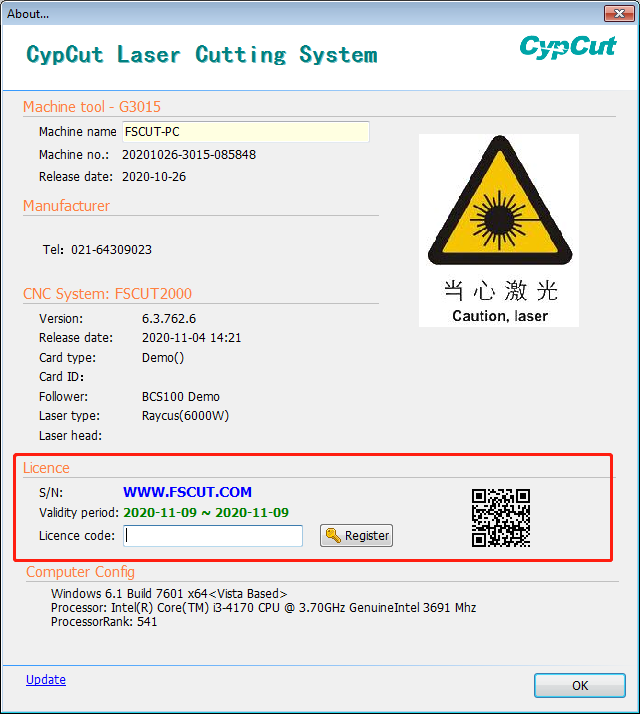
于問號.png) on top right position of CypCut interface will open the 'About window', which displays basic information including system status, CypCut version, control card model, and
on top right position of CypCut interface will open the 'About window', which displays basic information including system status, CypCut version, control card model, andit's where to register license code to set system service time for security and payment collection purpose.
????????
CypCut Machine Config Tool
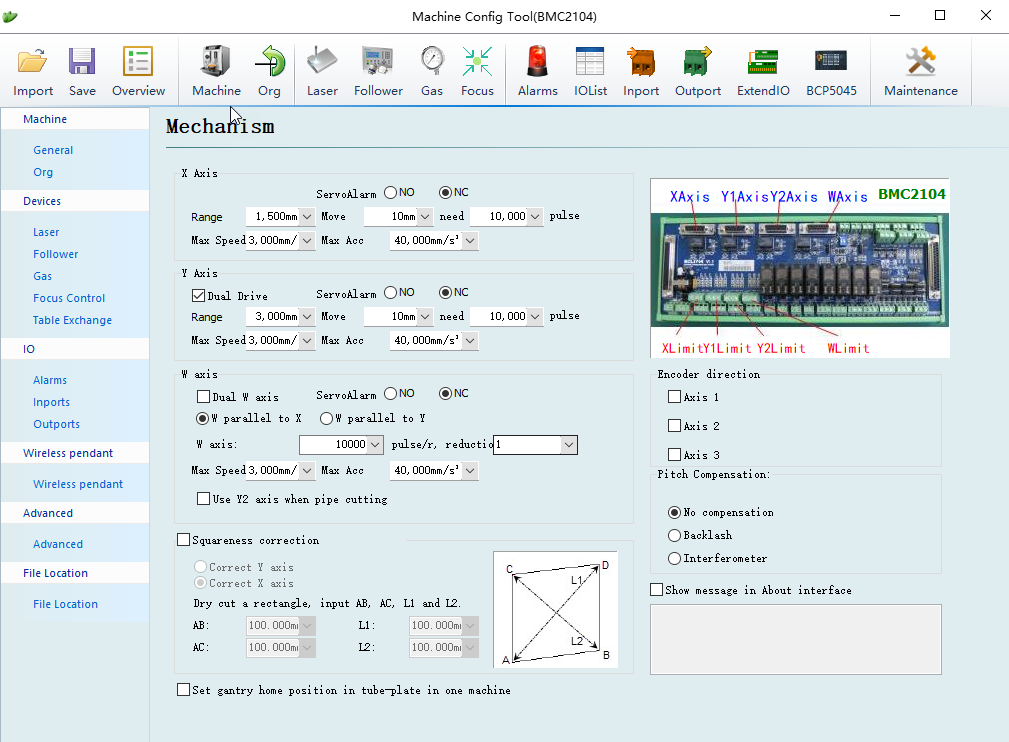
CypCut machine config tool
 is where machine manufacture finish the machine configuration and prepare machine ready to run, including to conifg servo axes, origin
 and limit, laser source, height control unit, alarm and warning, gas system, I/O and more. It's installed automatically along with CypCut main program.?
? ?
Check in machine config topic for more knowledge.
BCS100 Height Control Unit
The height controlling and distance following approached by BCS100 height controller and integrated in CypCut program. You can either setup BCS100 from CypCut user interface or
do it from BCS100 hardware panel.
?????
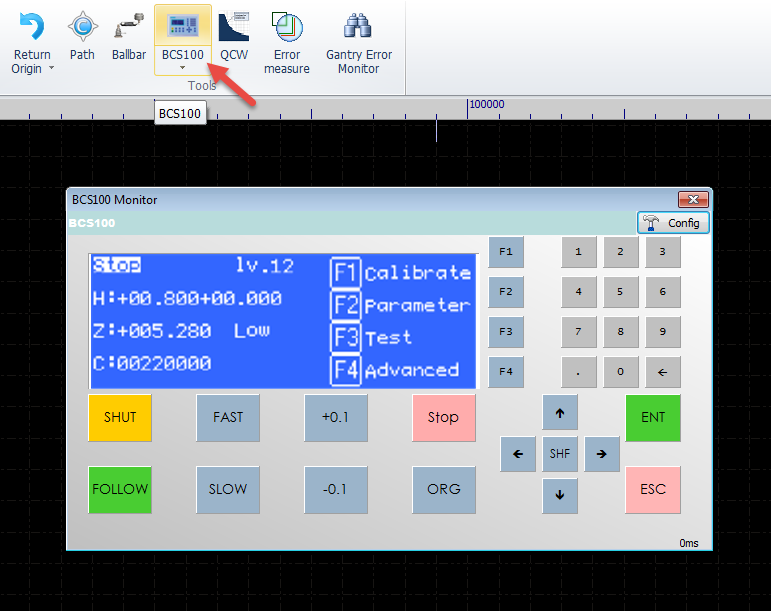 ?
?Check in BCS100 topic for more knowledge.
CypCut OEM Version
CypCut allows machine manufactures to have OEM version with customized desktop icon, company logo, software name and start-up image. CypCut OEM version can also create
cutting technique file *.fsm with protection that cannot be read by CypCut system of other OEM manufacture.?
Notice: each control card built-in the manufacture information (the original buyer), and not compatible with CypCut installer of other OEM version.
Related article 'can not read the material library of other manufacture'.
Related Articles
- (Basics) Import drawing
- (Basics) Optimize drawing
- (Basics) Technique setting
- (Basics) Toolpath planning
- (Basics) Machining precheck
- (Basics) Machining control
-
-
-
-
CypCut Pre Knowledge
Get familiar with some pre-knowledge including CypCut user interface, machine config tool, hardware components, OEM version, and system license that get you prepared to follow
‘Basics topic’ series.?
- CypCut System Diagram
- CypCut User Interface
- CypCut About Window
- CypCut Machine Config Tool
- CypCut OEM Version
- BCS100 Height Control Unit
?
CypCut System Diagram
CypCut is hardware-based program in machine controlling.
?
CypCut Interface
CypCut is designed as graphical user interface with windows ribbon style.
? ? ? ? ??
- Drawing board (middle area in black) displays the parts geometry that you currently work on. The white box in the center is machine-scaled working zone.
- Title bar (at the very top) shows CypCut version message. On the left gives you Quick access to create a new file, open or save file.?
- Menu bar (underneath the title bar) displays File, Home, Draw, Nest, CNC and View tabs.
- Left tool bar lists quick access tools for sorting, drawing and editing etc.
- Control panel (on the right) is where you control machine finish a cutting task, which comes with 16 layer buttons of different color, control buttons of direction, laser, gas, start, stop and more.
- Information bar (at the bottom) with Draw, System and Alarm tabs record and display related messages.
- Bottom status bar (at the very bottom) shows operation message, cursor coordinate and control card model etc.
CypCut About Window
Click? on top right position of CypCut interface will open the 'About window', which displays basic information including system status, CypCut version, control card model, and
it's where to register license code to set system service time for security and payment collection purpose.
????????
CypCut Machine Config Tool
CypCut machine config tool is where machine manufacture finish the machine configuration and prepare machine ready to run, including to conifg servo axes, origin
and limit, laser source, height control unit, alarm and warning, gas system, I/O and more. It's installed automatically along with CypCut main program.?
? ?
Check in machine config topic for more knowledge.
BCS100 Height Control Unit
The height controlling and distance following approached by BCS100 height controller and integrated in CypCut program. You can either setup BCS100 from CypCut user interface or
do it from BCS100 hardware panel.
????? ?
Check in BCS100 topic for more knowledge.
CypCut OEM Version
CypCut allows machine manufactures to have OEM version with customized desktop icon, company logo, software name and start-up image. CypCut OEM version can also create
cutting technique file *.fsm with protection that cannot be read by CypCut system of other OEM manufacture.?
Notice: each control card built-in the manufacture information (the original buyer), and not compatible with CypCut installer of other OEM version.
Related article 'can not read the material library of other manufacture'.
Related Articles
- (Basics) Import drawing
- (Basics) Optimize drawing
- (Basics) Technique setting
- (Basics) Toolpath planning
- (Basics) Machining precheck
- (Basics) Machining control

